


NEHAR

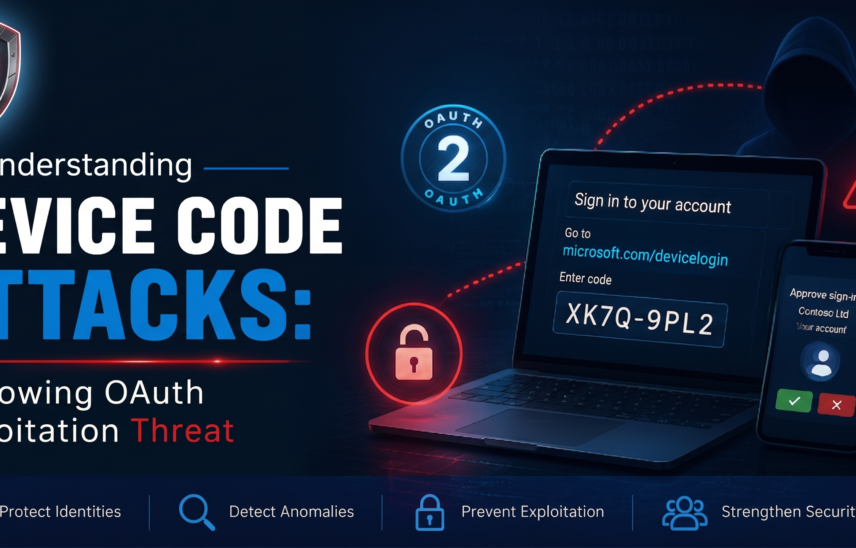
Understanding Device Code Attacks: A Growing OAuth Exploitation Threat

Shape1 Shape2
Understanding Device Code Attacks: A Growing OAuth Exploitation Threat

A Device Code Attack is a sophisticated phishing and account takeover technique that exploits the legitimate OAuth device code flow used by platforms such as Microsoft Entra ID (Azure AD), Microsoft 365, and other cloud services.

In recent years, this attack method has gained traction among cybercriminals because it allows them to bypass traditional password theft techniques and, in some cases, evade protections like multi-factor authentication (MFA) fatigue defenses.


What Is the Device Code Flow?

The device authorization flow was originally designed to support devices that cannot easily present a standard web-based login experience. These include:

  • Smart TVs
  • Internet of Things (IoT) devices
  • Printers
  • Conference room systems
  • Command-line tools (CLI)

Instead of entering credentials directly on such devices, users authenticate through a secondary, trusted device. The process typically works as follows:

  1. The device prompts the user to visit a login URL.
  2. The user is given a short, temporary device code.
  3. The user enters the code on another device (such as a phone or laptop).
  4. After successful authentication, the original device receives an access token.

Example:

  • Visit: microsoft.com/devicelogin
  • Enter code: ABCD-EFGH

Once completed, the device is authorized without requiring direct credential entry.


How Attackers Exploit This Flow

Attackers manipulate this legitimate authentication process by tricking users into entering a device code generated by the attacker.

Typical Attack Flow

  1. The attacker initiates a device login request.
  2. Microsoft (or another provider) generates a valid device code.
  3. The attacker sends a phishing message via:
    • Email
    • Microsoft Teams
    • SMS
    • Fake IT support notifications
  4. The victim is instructed to visit the real login page and enter the code.
  5. The victim successfully completes authentication—often including MFA.
  6. The system issues access tokens tied to the attacker’s session.
  7. The attacker gains access to the victim’s resources, such as:
    • Email
    • Teams
    • SharePoint
    • OneDrive
    • Other cloud applications

Why Device Code Attacks Are So Dangerous

MFA Can Be Effectively Bypassed

Although MFA is used, it does not prevent the attack because the victim is authenticating a session initiated by the attacker. No password needs to be stolen afterward.

The Process Appears Legitimate

Victims interact with actual Microsoft URLs, making the experience appear trustworthy and reducing suspicion.

Harder to Detect

Traditional phishing detection methods often fail because:

  • There is no fake login page
  • No credentials are harvested directly
  • The interaction happens entirely on legitimate infrastructure

Enables Persistent Access

Attackers may obtain:

  • Refresh tokens
  • Long-lived sessions
  • OAuth permissions

This allows continued access even after initial detection.


Indicators of a Device Code Attack

Security teams can detect potential attacks by monitoring for unusual activity, including:

  • Sign-ins from unfamiliar or distant locations
  • Authentication attempts using Device Code Flow
  • Suspicious OAuth application consent
  • “Impossible travel” alerts
  • Access from VPNs or anonymous IP addresses
  • Creation of suspicious mailbox rules
  • High volumes of token issuance

In Microsoft Entra ID Logs, Watch For:

  • Authentication protocol labeled as Device Code Flow
  • Sign-in risk anomalies
  • Token grant events

Real-World Targets

Device code attacks have been observed targeting high-value organizations and individuals, including:

  • Government agencies
  • Financial institutions
  • Universities
  • Critical infrastructure organizations
  • Cloud administrators
  • Corporate executives

Due to their stealth and reliability, these attacks have been leveraged in advanced phishing campaigns, including those linked to nation-state threat actors.


Prevention and Mitigation Strategies

Restrict Device Code Flow

If your organization does not rely on this authentication method, consider disabling it or limiting its use through policy controls.

Implement Conditional Access Policies

Apply restrictions to reduce risk, such as:

  • Geographic location controls
  • Blocking unmanaged or non-compliant devices
  • Preventing access from high-risk sign-ins
  • Restricting unknown or unapproved applications

Monitor OAuth Permissions

Regularly review for:

  • Suspicious application consent
  • Excessive delegated permissions
  • Signs of token misuse

Strengthen User Awareness

Educate users to:

  • Never enter a device code they did not initiate
  • Avoid responding to unexpected authentication prompts
  • Verify requests from IT departments

Enhance Token Protection

Use security features such as:

  • Continuous Access Evaluation (CAE)
  • Short token lifetimes
  • Session revocation policies
  • Token protection mechanisms

Example Attack Scenario

An employee receives a message:

“Your Teams session has expired. Please reauthenticate at microsoft.com/devicelogin using code HJ72-KLMN.”

The employee:

  1. Visits the legitimate Microsoft page
  2. Enters the provided code
  3. Completes MFA

At that moment, the attacker gains access tokens linked to the employee’s account.

Result: The account is compromised—even though no password was stolen.


Key Takeaway

Device code attacks highlight a critical shift in modern cyber threats: attackers are increasingly targeting authentication workflows and tokens, rather than credentials alone.

To defend against these attacks, organizations must move beyond traditional security approaches and focus on:

  • Identity protection
  • OAuth security
  • Token management
  • Conditional access controls
  • User behavior monitoring

In today’s environment, securing authentication flows is just as important as protecting passwords and enforcing MFA.